
Our sewing pattern app is here: digitize sewing patterns with your phone, now on the App Store and Google Play
Our app for iPhone and Android is ready. What it does, how it works with your computer, and a big thank you to everyone who tested it with us.

Rasmus Liebscher
Co-Founder & Developer
In short: PatternScan Pro is now available for iPhone and Android, on the App Store and Google Play. Photograph your paper pattern with four printed Reference Tiles. The app detects the contour and turns it into a true to scale file: SVG, PNG, DXF or PACX for CLO3D. Everything lands in the same library as the web app, so you can keep working on your computer. The first 14 days are free.
Download on the App Store · Get it on Google Play
The beta is over. Since November 4, 2026, our companion app is out for everyone, on iPhone and Android. I first showed it in June, with plenty of question marks still attached. Today it is an app we are truly proud of, and I am thrilled we can finally share it with all of you.
Thank you to everyone who tested with us
This app would not be what it is without our more than 100 testers. You photographed patterns on kitchen tables, cutting tables and floors. You sent us screenshots when something went wrong and asked questions we had never thought of. Many of the hints the app gives after a photo, like when a Reference Tile sits too far from the pattern piece, came straight from your feedback.
On Android you mattered twice: a new app only gets into the Play Store after a group of testers has really used it for at least two weeks. Thank you for being part of it! If you were in the beta, please install the app once from the App Store or Google Play. All your patterns are still there.
What the app does
Here is everything the app can do today, in the order you go through when digitizing.
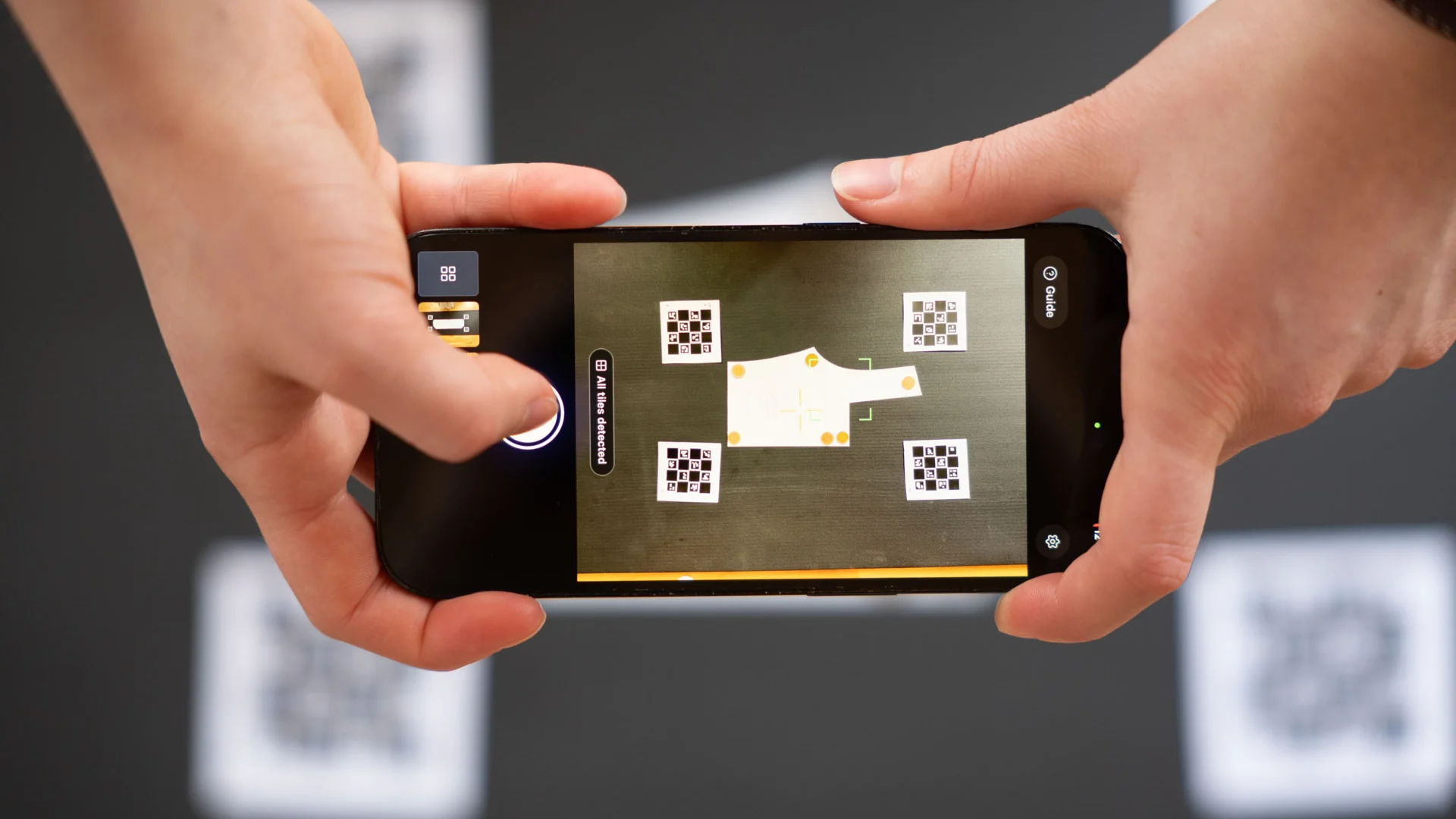
Capture with a live check
The camera view tells you whether the shot will work. The app checks sharpness, light, motion and angle, and shows whether all four Reference Tiles are in the frame. You only take the photo once everything is right. See Photographing with PatternScan Pro Mobile for the ideal setup.
Contour and scale, automatically
Moments after the photo, the app detects the contour of your pattern piece and brings it to real size, in millimetres. The Reference Tiles take care of perspective and scale. Calibration corrects the distortion of your camera lens, and the app already brings it for most phones.
Clear feedback on every photo
After each shot the app tells you whether it is good or worth a quick check, and why. If a Reference Tile is too far away, several outlines are in the picture or the piece blends into the background, you get a concrete tip for the next photo.
Check measurements, tidy up contours
Check the measurements on your phone before you export. If the app picked up something at the edge of the photo as an extra contour, remove it with one tap.
Your Pattern Library
Every pattern lands in your library. Rename it, keep things organized, and anything you delete disappears from all your devices.
Export and share
Four formats, straight from your phone: SVG for Illustrator, Inkscape and Affinity, DXF for pattern CAD, PACX for CLO3D and PNG as an image. Share the file through your phone's share menu, by email, to the cloud or to your computer. Exporting and Opening Your Files explains which format goes where.
Measure the accuracy yourself
In the settings you will find "Test measurement accuracy". Lay out a blank A4 sheet with a Reference Tile at each corner and take one photo. The app shows the size it measured and how many millimetres that is off the real 210 × 297 mm. You see on your own phone how accurate it gets. I think every app that works with measurements should offer this.
A calibration profile, if your phone needs one
On some Android phones, the app does not bring calibration out of the box. It then walks you through a calibration profile once: print a checkerboard and take 20 photos, with the app showing you how to hold the phone for each. The profile then works on all your devices. More in Create a Calibration Profile.
Phone and computer: how they work together
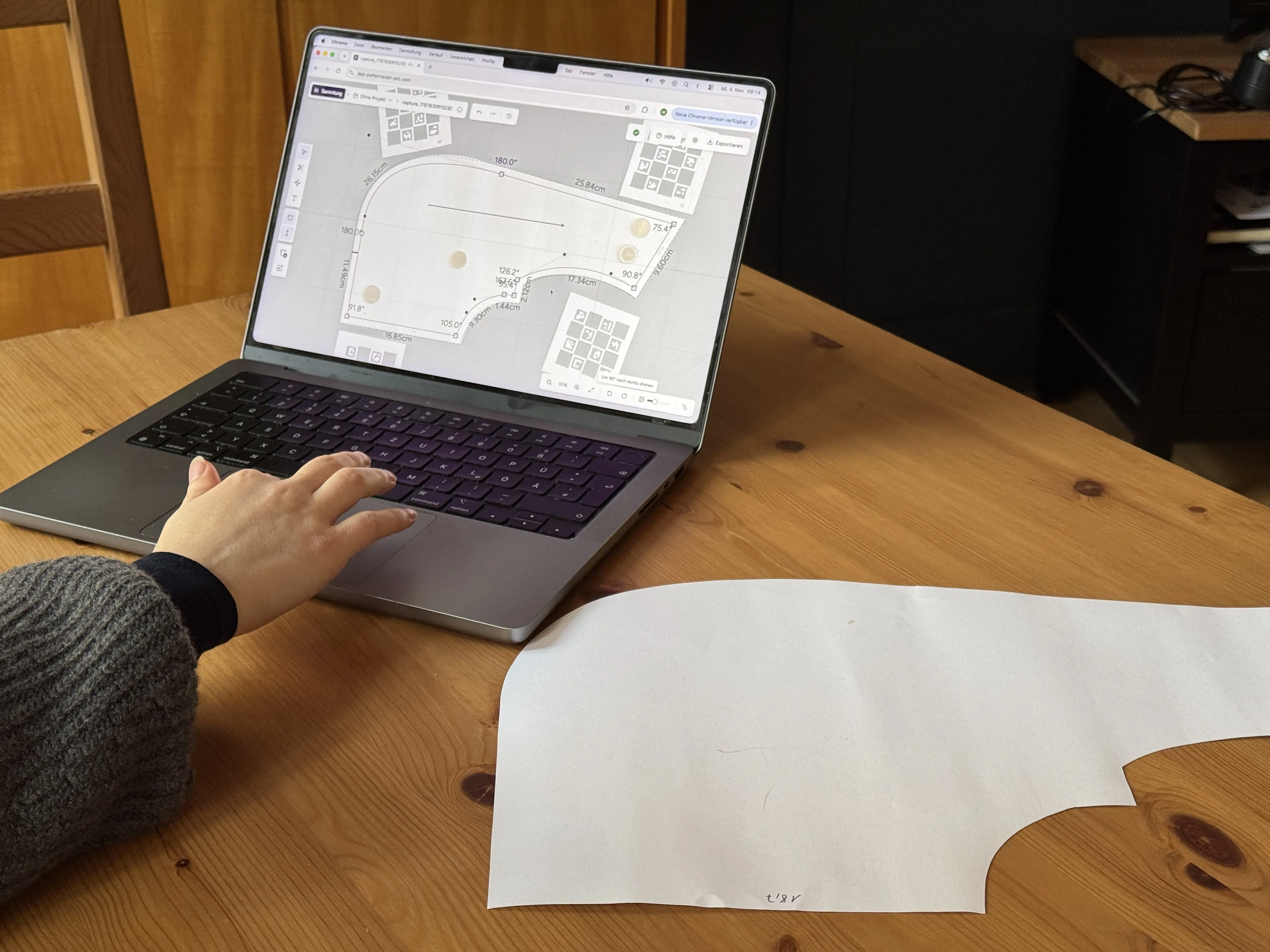
Your phone takes the photo, the big screen handles the fine work. Everything you capture with the app shows up moments later in the same library at app.patternscan-pro.com. No transferring, no digging through your camera roll.
On your computer you can:
- adjust curves and control points, read and type edge lengths and corner angles (Editing Contours, Control Points and Curves)
- add seam allowance, grain line, notches and internal lines (Seam Allowance, Grain Line, Notches and Internal Lines)
- trace one size from a multi-size sheet without cutting it (Drawing Contours by Hand)
- export in all four formats
You can still upload photos from your regular camera app on the computer. For those, you create a calibration profile once.
What you need
- an iPhone or an Android phone (the app does not run on iPad)
- the four Reference Tiles, free to print from Printing and Using the References. Print at 100 percent; each tile measures 8 × 8 cm.
- a flat surface that contrasts with your pattern, ideally dark, and even light
- a PatternScan Pro account
iPhone or Android: what is different?
On iPhone you create your account right in the app and subscribe through your Apple ID, with a 14-day free trial. Cancel anytime in your Apple ID settings.
On Android you sign in with your PatternScan Pro account. Create the account and pick your plan on the web at app.patternscan-pro.com first, also with a 14-day free trial.
PatternScan Pro starts at 9 euros a month, the same on the web and in the App Store. If you are part of a team, just sign in with your team account.
Who is the app for?
For anyone who works with paper patterns and needs them as files: pattern makers who sell their patterns digitally, ateliers bringing their archive into pattern CAD or CLO3D, fashion students, and everyone who projects patterns onto fabric. It is made for garment patterns, not for embroidery or knitting. See all use cases on our Pattern Digitizing App page.
Frequently asked questions
Is there an app that scans sewing patterns?
Yes. PatternScan Pro is on the App Store for iPhone and on Google Play for Android. Photograph your pattern piece with four printed Reference Tiles, and the app detects the contour and exports a true to scale SVG, PNG, DXF or PACX file. For other ways, from a home scanner to a copy shop, read How to Scan Sewing Patterns.
How much does the app cost?
The download is free. To digitize, you need a subscription starting at 9 euros a month. The first 14 days are free.
Do I need a computer?
No. Capturing, checking measurements and exporting all work on your phone. For fine work like seam allowance or curves, open the same pattern on your computer in the browser.
Will the app run on my phone?
The app runs on iPhone and Android phones, not on iPad. On first launch it tells you whether your device is supported and whether you need a calibration profile.
How accurate is the result?
If your photo is right, meaning the piece lies flat, you shoot from straight above and all four Reference Tiles are visible, your digital pattern is accurate to the millimetre. Check it yourself with the accuracy test in the app or a ruler along a straight edge. More in Digitizing True to Scale.
Do I have to cut out my pattern?
For automatic detection, yes. For a multi-size sheet, photograph the whole sheet and trace the size you need in the editor on your computer.
Where is my data stored?
On servers in the EU, GDPR compliant.
Get the app and give it a try!
Print the Reference Tiles, lay a pattern piece on a dark surface and take your first photo. I can't wait to see what you digitize, and I am happy to hear from you at mail@patternscan-pro.com.
Download on the App Store · Get it on Google Play
Want to know why we developed PatternScan Pro in the first place? Maren tells the story in this post.
Rasmus
Rasmus is Co-Founder of PatternScan Pro and develops the app with a focus on precision and intuitive usability.
Digitize sewing patterns without tracing.
Test PatternScan Pro free for 14 days with the full feature set. You need your smartphone, a printer and one pattern you always wanted digital.

Photograph your paper pattern and get an automatically scaled digital version with PatternScan Pro.
Usage